- Open IIS
- Expand your local server
- Click on Server Certificates
- Select 'Create Self-Signed Certificate' on the right.
- Enter a name (ie - local)
- Click on Web Sites
- Right click on Default Web Site and select Bindings
- Add a new Web Site Binding for https and select your 'local' certificate
- Click ok and close.
- For whatever reason, a restart was required, but this may not be the case for everyone.
Showing posts with label Server Config. Show all posts
Showing posts with label Server Config. Show all posts
Thursday, November 30, 2006
Using a https certificate in Vista
Quite often I find the need to develop locally for a site using https. You can do this with Self-Signed Certificates in IIS 7.0. You don't have to install anything, so it's much easier to set it up than it has been in the past.


Thursday, October 26, 2006
SQL Server 2000 on Vista?
I read a number of articles that mentioned SQL Server 2000 will not install and/or is not supported on Vista. I just wanted to let you know that it WILL install. The only major caveat that I ran into was in enterprise manager when trying to connect to the 'local' instance. I had to dump that connection and connect to the actual named install of the sql server (which was my server name).
There is also an issue with SQL Server starting properly when Vista loads up. The MSSQLSERVER service was set to start up "Automatic" but in fact this doesn't work. If you change the startup type to "Automatic (Delayed Start)" things will work as expected.
Good luck!
There is also an issue with SQL Server starting properly when Vista loads up. The MSSQLSERVER service was set to start up "Automatic" but in fact this doesn't work. If you change the startup type to "Automatic (Delayed Start)" things will work as expected.

Good luck!
CFMX Setup on Vista
I just installed CFMX 7 on Vista Ultimate but it wasn't a very streamlined process. The CFMX installer doesn't support IIS 7 so a number of manual steps were needed after the fact. There is also a compatibility adjustment that you must make.
First, you need to run the ColdFusion Installer using the Program Compatibility Wizard. This will normally appear after the installer hangs. If it doesn't, the location to create a shortcut with is "%SystemRoot%\system32\mshta.exe res://%SystemRoot%\system32\acprgwiz.dll/compatmode.hta". There are a few options that you are going to want to choose.
- Microsoft 2000 (Using Windows XP will not work)
- On the next screen, choose 256 colors and all of the 'disable' options
- Next, make sure you run this program as an administrator
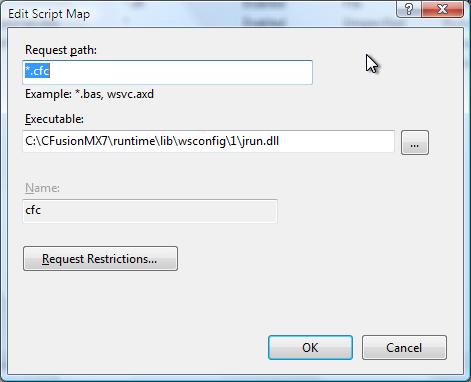
This should get you through the basic install. For whatever reason, the isapi filter that normally handles each request is not created. A Script Map needs to be created in the Handler Mapping in IIS for your server.
Prior to setting up the Handler Mappings, you need to download jrun.dll from another installation and make sure that file exists in the following directory : 'c:\cfusionMX7\runtime\lib\wsconfig\1' -- You may want to simply copy the entire "1" directory under wsconfig.

First, pop open the IIS Console which looks like so, although you probably won't have either of the ISAPI options if you did a default install of IIS.
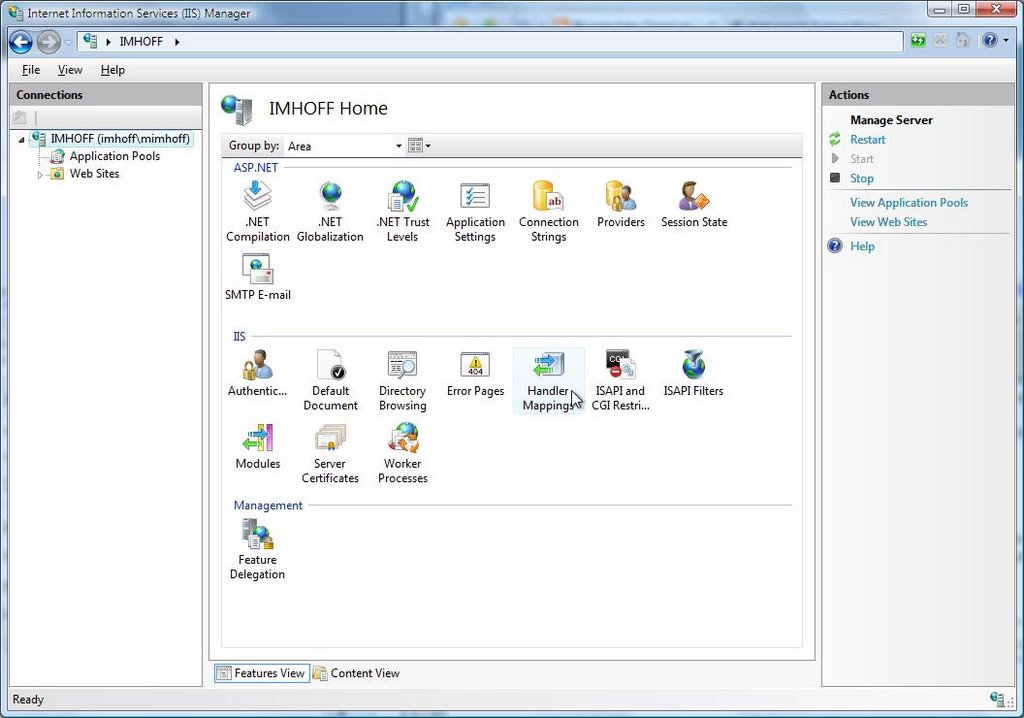
You will want to then open up the Handler Mappings option and create a new Script Map. You need to create one for your cfm files and another for your cfc's.

When you're done, the list of Handler Mappings should look familiar to this.


Wednesday, April 05, 2006
Missing Template Handler in ColdFusion MX 7
Setting up the missing template handler in ColdFusion MX 7 and actually getting it to work correctly is a little more involved than most would think. Here are the steps to get it set up correctly, and some details that aren't very apparent.
- Open the ColdFusion MX 7 Administrator.
- Determine what error handler should be used.
I needed to setup the missing template handler for http://localhost/client1/. This meant that I needed to use /client1/common/error.cfm as my missing template handler value. The ColdFusion Administrator states to use a relative path, but this is really an absolute path from the webroot (this applies to the site-wide error handler as well). - Create a ColdFusion Mapping for this virtual directory.
While attempting to do the above, the administrator kept telling me that the site wide administrator does not exist. To rectify this, you need to temporarily setup a ColdFusion mapping with the following attributes.
Logical Path: /client1
Directory Path: [insert path to 'client1' folder here] - Go back to the settings page and hit save. The CF Administrator shouldn't have an issue with your handler at this point in time.
- You then need to setup your website or virtual directory in IIS so that it knows to use the CF 404 page, and that it needs to check for missing files.
Please see http://www.macromedia.com/go/95ee04fb for more information. - Restart IIS and CF and everything should be working.
Items to note:
- Once you setup IIS to check for files, 404 error messages will no longer be logged by ColdFusion. I'm assuming this is because IIS supercedes CF when it comes to 404 errors when configured similar to above.
- When following these instructions, the error handler stays in effect even if the missing template handler is removed from the CF Administrator.
- The ColdFusion Mapping that is required in order to successfully validate the Missing Template Handler value can be deleted once the handler is in place and accepted by the CF Administrator.
Saturday, April 01, 2006
Working with the ColdFusion MX Internal Web Server
Here is a good technote from Macromedia that describes the following items:
- Using the built-in web server
- Disabling the web server
- Changing the default port number
- Changing the root directory
- Enabling different filename extensions
- Disabling or enabling directory browsing
- Adding a default document type
- Adding a virtual directory or web mappings
http://www.macromedia.com/support/coldfusion/adv_development/config_builtin_webserver/
Subscribe to:
Posts (Atom)